


Backgrounds
Backgrounds are designs in various categories, which appear behind the layouts, and often provide the overall style for the page.
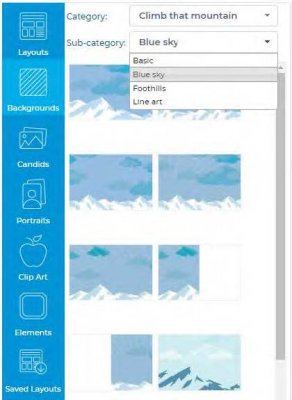
- Backgrounds
- Backgrounds are designs which appear behind the layouts, and often provide the overall style for the page.
- You can can choose from one of the included backgrounds available in the backgrounds tab, to the left of the section preview. You can also use any image as a background – see the article on custom backgrounds.
- Backgrounds are organized into categories and sub-categories by theme. Click on the Backgrounds tab, and then use the Category and Sub-category menus to browse and view the available backgrounds.
- These built in backgrounds apply to the entire spread.
- To change the background for a spread, select a background thumbnail, then drag and drop it from left to right onto the spread.
TIP: Refer to the Content Reference Guide for a complete listing of all of the available Backgrounds, Layouts, Clip Art, Elements and Fonts. This is an excellent tool to aid in your yearbook planning and design! You can also browse Studio Source Yearbook’s extensive collection of downloadable backgrounds and clipart that can be imported into the software by going to our Content Catalog here.